

Quick answerTo link CSS to HTML, put <link rel="stylesheet" href="style.css"> inside the <head> of your HTML file, where href is the path from the HTML file to your CSS file. Save both files, reload the page, and the styles apply. You can also write CSS in a <style> tag or a style attribute.
The code to link a CSS file to HTML
You need two files in the same folder: your page (index.html) and your stylesheet (style.css). The one line that connects them is the <link> tag in the head.
my-site/
├── index.html
└── style.css
index.html
<!DOCTYPE html>
<html lang="en">
<head>
  <meta charset="utf-8">
  <title>My page</title>
  <link rel="stylesheet" href="style.css">
</head>
<body>
  <h1>Hello, CSS!</h1>
  <p class="note">This text is styled by style.css.</p>
</body>
</html>
style.css
body {
  font-family: system-ui, sans-serif;
  background: #fbfaf7;
}
h1 {
  color: #e34c26;
}
.note {
  padding: 12px;
  border-left: 4px solid #e34c26;
}
Open index.html in your browser and the heading turns orange. Notice that the CSS file holds only CSS rules: no <style> tags and no HTML.
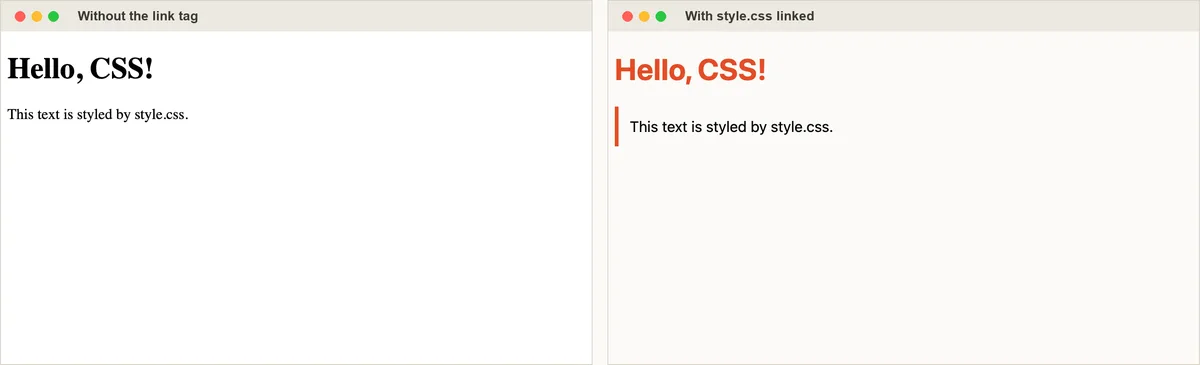
<link> line removed. Right: style.css linked.What each part of the link tag does
| Part | Needed? | What it does |
|---|---|---|
<link> | Yes | Connects an outside resource to the page. It has no closing tag. |
rel="stylesheet" | Yes | Tells the browser the file is CSS. Without it, nothing is applied. |
href="style.css" | Yes | The path or URL of the CSS file. |
media="print" | Optional | Only use the file for printing (or screen, or a media query like (max-width: 600px)). |
type="text/css" | No | Old HTML4 habit. CSS is the default in HTML5, so you can leave it out. |
How to link an external CSS file in another folder
Most "CSS not working" problems are a wrong path. The href is worked out from the folder the HTML file is in:
| Where the CSS file is | href to use |
|---|---|
| Same folder as the HTML file | style.css |
In a css folder next to the HTML file | css/style.css |
| One folder up from the HTML file | ../style.css |
Two folders up, then into assets | ../../assets/style.css |
| From the root of your website (on a web server) | /css/style.css |
| On another website or a CDN | https://example.com/style.css |
Watch out for paths that start with /. On a real web server, /css/style.css means "from the site's root", but when you open the file straight from your computer (the address bar shows file://) it means the root of your hard drive, so the CSS won't load. Use paths without a leading slash while you work locally.
my-site/
├── index.html          → href="css/style.css"
├── css/
│   └── style.css
└── blog/
    └── post.html       → href="../css/style.css"
External, internal and inline: three ways to link HTML to CSS
1. External CSS: a separate .css file loaded with <link>. One file can style every page of your site, and the browser caches it.
<link rel="stylesheet" href="style.css">2. Internal CSS: rules inside a <style> tag in the head. Handy for a single page, an email or a quick test.
<style>
  h1 { color: #e34c26; }
</style>
3. Inline CSS: a style attribute on one element. It only affects that element.
<p style="color: #e34c26; font-weight: bold;">Important</p>| Method | Best for | Downside |
|---|---|---|
| External | Real websites with more than one page | One extra file to keep track of |
| Internal | Single pages, HTML emails, demos | Can't be shared between pages |
| Inline | One-off tweaks, email templates | Hard to maintain; beats most other rules |
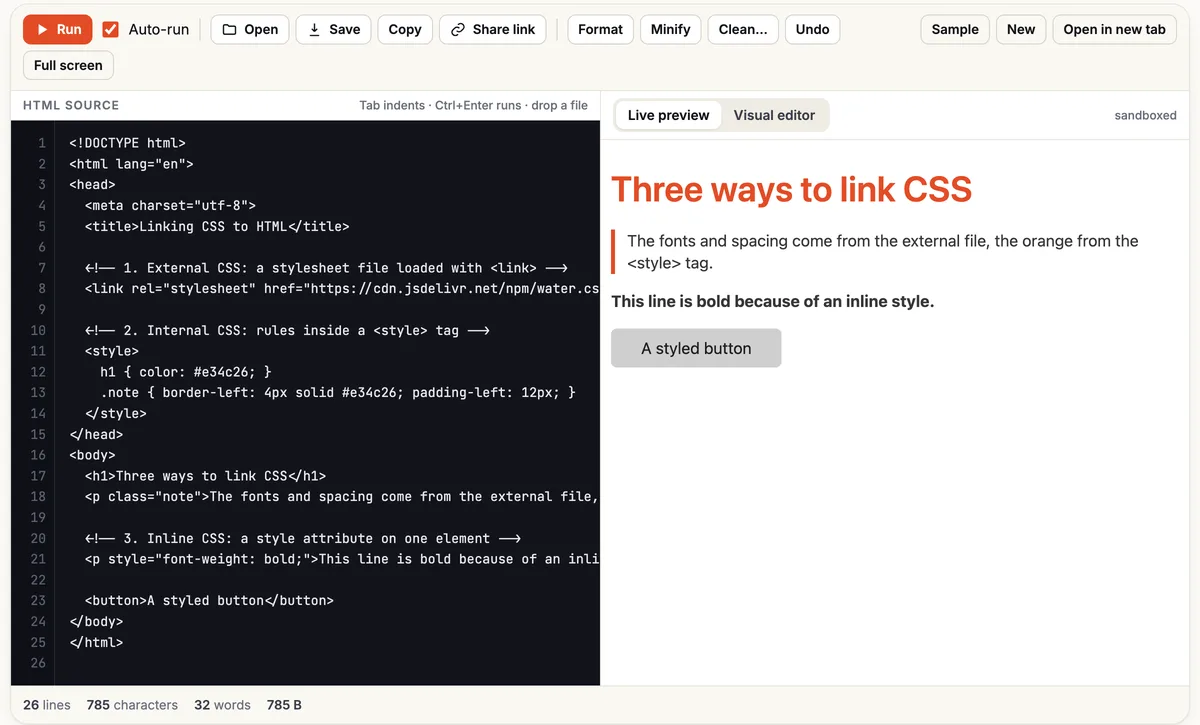
When the same property is set in more than one place, inline styles win, then whichever of <link> and <style> comes later in the head (for selectors that are equally specific). This example uses all three. Here is how it renders:
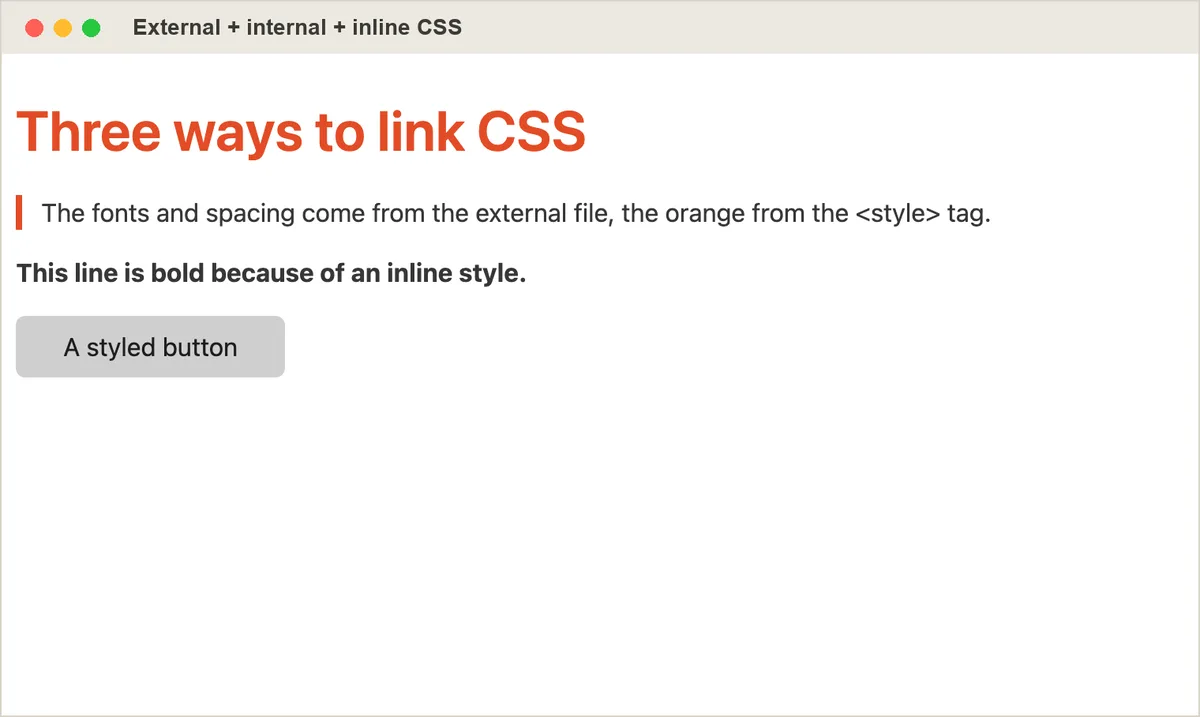
<style>) and inline CSS working together on one page.Open it in the editor and change the colours to see which rule wins:
Open this example in the editor →
The editor keeps a whole page in one file, so it can't read a style.css from your computer. The example loads its external stylesheet from a CDN instead, which works the same way.
Linking more than one style sheet
You can add as many <link> tags as you need. They load in parallel and apply in order, so put general styles first and the styles that should win last:
<link rel="stylesheet" href="css/reset.css">
<link rel="stylesheet" href="css/layout.css">
<link rel="stylesheet" href="css/theme.css">
<link rel="stylesheet" href="css/print.css" media="print">
You may also see @import url("theme.css"); at the top of a CSS file. It works, but the browser can't start downloading the imported file until it has read the first one, so pages load more slowly. Prefer several <link> tags.
Linking a CSS framework from a CDN
Frameworks like Bootstrap are linked exactly the same way, just with a full URL. Put your own stylesheet after the framework so your rules can override it:
<link rel="stylesheet" href="https://cdn.jsdelivr.net/npm/bootstrap@5.3.3/dist/css/bootstrap.min.css">
<link rel="stylesheet" href="style.css">
Framework docs often add integrity and crossorigin attributes to their CDN links. Copy those from the official docs rather than typing them, because the integrity value must match the file exactly.
CSS not linking to HTML? Check these 9 things
- The path is wrong. Press F12, open the Network tab and reload. A red
style.csswith status 404 means the browser can't find the file. Fix thehrefusing the path table above. - Upper and lower case don't match.
Style.cssandstyle.cssare different files on most web servers, even if your computer treats them as the same. rel="stylesheet"is missing or misspelled. Without it the file is downloaded but never applied.- The file isn't really .css. Some editors save
style.css.txt. Turn on file extensions in your file manager to check. - The browser is showing an old copy. Do a hard reload with Ctrl+Shift+R (Cmd+Shift+R on Mac).
- The CSS file contains HTML. Remove any
<style>tags or HTML from the .css file. It should contain only CSS rules. - A leading slash on a local file.
href="/style.css"fails onfile://. Usehref="style.css". - "Refused to apply style… MIME type ('text/html')". The server sent back an HTML page (usually its 404 page) instead of your CSS. It's the same wrong-path problem as number 1.
- The file loads but a rule doesn't apply. Check the selector spelling (
.noteforclass="note",#mainforid="main"), then right-click the element → Inspect to see which rule is overriding yours.
Still stuck? Paste your page into the HTML validator. An unclosed tag in the head can stop the browser from reading the <link> line.
Linking CSS in VS Code
In VS Code, type link:css in an HTML file and press Tab. Emmet writes <link rel="stylesheet" href="style.css"> for you. Typing ! then Tab in an empty file creates a full page skeleton you can add it to. Hover over the href value and Ctrl/Cmd-click it: if VS Code opens the CSS file, the path is right. For a ready-made <head> with the stylesheet, viewport and meta tags already in place, copy the HTML5 boilerplate.
JavaScript files are linked in a similar way, with a <script src> tag instead of <link>. See how to link JavaScript to HTML.
Frequently asked questions
Where do I put the link tag for CSS?
Inside the <head> of the page, usually after the <meta> and <title> tags. A <link> in the body also works, but the page may briefly appear without styles while it loads.
Can I link multiple CSS files to one HTML file?
Yes. Add one <link rel="stylesheet"> tag per file. They apply in order, so a rule in a later file overrides the same rule in an earlier one.
Why is my CSS not linking to my HTML?
Usually the path in href is wrong or the browser is showing a cached copy. Check the Network tab in developer tools (F12) for a 404 on the CSS file, fix the path, then hard-reload with Ctrl+Shift+R.
Do I need type="text/css" in the link tag?
No. In HTML5 stylesheets are CSS by default, so <link rel="stylesheet" href="style.css"> is enough.
Is it better to use link or @import?
Use <link>. Linked stylesheets download in parallel, while @import makes the browser wait for the first CSS file before it can fetch the next one.
How do I link CSS to HTML in VS Code?
Type link:css and press Tab to insert <link rel="stylesheet" href="style.css">, then change href to your file's path. Ctrl/Cmd-click the path to check that it opens the right file.